A Tody alternative for families: why households with kids choose sharechores
Tody plans cleaning room by room, and for a family the catch is in the plan names: Tody’s free plan is the core cleaning plan for one person, and sharing it with a household is paid. sharechores starts from the other end: the free plan is already a household of up to 12, children included, on whatever screens you own.
A cleaning plan for one, or a household plan for everyone
On Tody, syncing with your household is a paid Premium+ plan, priced by headcount: $25 a year for two members, $40 a year for six and $80 a year for twelve, billed yearly through the App Store or Google Play. Tody’s FAQ also says there is currently no web version, so it runs on iPhone, iPad and Android only.
So the moment a second person needs to see the same list on their own device, you’re choosing a paid tier sized by how many people live with you. In a family with three kids, that is the 6-member plan.
In sharechores, adding a person never changes the price. Your partner joins with an email link or Google sign-in, each child is a first name, and the free plan holds them all.
What sharing costs by household size
| App | 2 people | Up to 6 people | Up to 12 people | How it’s billed |
|---|---|---|---|---|
| sharechoresOur pick | Free | Free | Free | No bill to share; optional $3 pass or $10 a year for extras |
| Tody | $25 a year (Duo) | $40 a year (Family) | $80 a year (Team) | Yearly via App Store or Google Play, after a 30-day free trial |
| App | Opens on | Room status | Kids | Who did what | Printable chart |
|---|---|---|---|---|---|
| sharechoresOur pick | The web, on whatever screen you own | A meter per room that fills as days pass | A children’s screen on the family device; a sticker per job | Weekly tally, free | Weekly fridge chart with QR |
| Tody | iPhone, iPad and Android; no web version | Due state per room, green to red | Not stated publicly | Monthly report on Premium+ | Not stated publicly |
Rooms that show you where the house is slipping
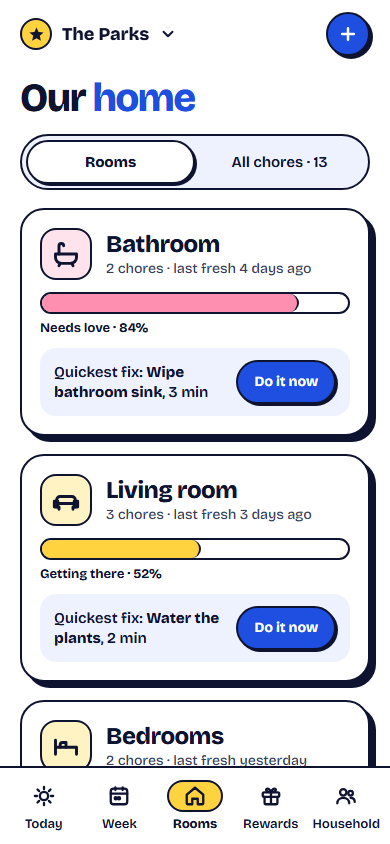
If you came to Tody for the room view, sharechores keeps that idea. Each room carries a “how dirty is it” meter. It creeps up day by day since that room’s chores were last done, and a single tick drains it. Glance at the rooms screen and the bathroom that everyone has been avoiding is obvious, with no scrolling through lists.
sharechores adds a physical shortcut too. Every room can get its own round sticker carrying a QR code and the words “Scan when you clean”. Put it inside the bathroom cabinet door or beside the washing machine, and anyone at home can point a phone camera at it to tick that room’s chores in a second.
Bringing the kids in without giving them a phone
A cleaning plan shared only by adults leaves the children as people you remind. In sharechores they become people who tick. Once a parent links the shared tablet, phone or computer with a QR code, that device always lands on the children’s screen: chunky buttons, each child’s own colour, and only today’s handful of jobs. Every tick earns points, and grown-ups can still tick for anybody.
- Ages 5–7: one or two jobs a day, like feeding a pet or putting shoes away.
- Ages 8–10: a room job on turns, such as wiping the bathroom sink.
- Ages 11–14: a bigger turn, like the bins or loading the dishwasher, with “Pass it on” when they’re out at practice.
Set up your rooms in sharechores tonight
- Start the household from the sharechores home page and add everyone.
- Create your rooms: kitchen, bathroom, living room, bedrooms, laundry, outside.
- On the free plan, give your five repeating chores to the rooms that slip fastest; one-time jobs never count against them.
- Mark the shared chores as rotating, either on every tick or with a Monday changeover.
- Print the room stickers and put one in each room.
- Link the family tablet to the children’s screen with its QR code.
Scan when you clean. Point your phone camera at this sticker after you finish a job in this room, tick it, and the meter drops back to empty. Thank you!
Good to know about the sharechores plans
Sharing is never the upgrade here. Everything this page has described, from the room meters to the kids screen and the room stickers, runs on Free, which allows five repeating jobs. Bigger homes with longer lists have two ways up. A three-month pass costs $3 once and simply expires, leaving your rooms and people untouched. The annual plan is $10 and keeps going until you cancel the renewal. Either one brings an unlimited chore list, a points shop for rewards, pocket-money records, the complete history, a Sunday recap by email and turn reminders on the phone. You won’t find an ad on any of it. For the wider field, see chore apps compared.
Sources
Based on publicly available information as of November 2026; features and prices may change.
Questions people ask
Is Tody free for a family?
Tody’s free plan is the core cleaning plan for one person. Syncing with a household is part of its paid Premium+ plans, from $25 a year for 2 members to $80 a year for 12. sharechores lets as many as twelve people share one list without paying.
Does Tody work in a web browser?
Tody’s FAQ says there is currently no web version. sharechores is browser-based, so a work laptop or an old tablet works as well as a phone.
Can sharechores show which rooms need cleaning?
Yes. Each room has a meter that fills as days pass since its chores were done and empties when someone ticks one.