Chore apps compared: why families switch to sharechores
Most parents who go looking for a chore app want one thing: to stop being the only person in the house who remembers, assigns and chases every job. An app only helps with that if the whole family can see their part, kids included, without a pile of logins, subscriptions or a new screen to buy. Here are nine ways families run chores, side by side, followed by what sharechores does differently, what it costs and how to move over in one evening.
Nine ways to run family chores, side by side
| Tool | Chores in a web browser | Free for the whole family | Ads on the free version | Kids need their own login or device? | Turns rotate automatically | First paid step |
|---|---|---|---|---|---|---|
| sharechoresOur pick | Yes, on any phone, tablet or computer, no app store | Up to 12 people: 5 repeating chores, turns, rooms, points, printable chart | None | No: first names only, one shared device is enough | Yes, on the free plan | $3 for 3 months, paid once, no renewal |
| Cozi | No: chores are in the iPhone and Android apps only | Chores are included in Cozi Free | Yes; Cozi Gold removes them | Each member signs in with an email and the shared family password | Not stated publicly | Cozi Gold: $39 a year |
| Tody | No web version | The free plan is for one person; household sync is paid | No | Not stated publicly | Yes | Family plan, 6 members: $40 a year |
| Sweepy | iPhone and Android apps | Free tasks; the generated daily checklist is premium | Not stated publicly | Not stated publicly | Not stated publicly | $3.99 a month or $19.99 a year, after a 3-day trial |
| S'moresUp | iPhone and Android apps | Intro Pack: create and assign chores | Not stated publicly | Each family member has a profile | Premium only | From $7.99 a month (App Store) |
| Skylight Calendar | No: runs on its own touchscreen device | Basic features with the device; stars and rewards need Calendar Plus | Not stated publicly | Kids tap their profile on the device | Not stated publicly | The device ($249.99 on sale, $319.99 list) plus Calendar Plus at $79 a year |
| Greenlight | iPhone and Android apps | No free plan stated | Not stated publicly | Kids’ app optional; the parent confirms name, birth date and SSN | Not stated publicly | Core: $5.99 a month |
| BusyKid | iPhone and Android apps | No free plan stated | Not stated publicly | Kids sign in on a device with a code | Not stated publicly | $48 a year, billed yearly |
| Paper chart on the fridge | No | Free | None | No | No: someone rewrites it | Paper and a pen |
Read the table by the column that matches your biggest headache. If the problem is that only you can see the list, look at the browser and kids columns. If the problem is that every job lands on the same child, look at turns. If the problem is one more monthly charge, look at the last column.
Why parents go looking for something else
The reasons are rarely about features on a pricing page. They’re about the moment the app stops helping and you’re back to reminding everyone yourself.
- The list only lives on one phone. Cozi’s chores are in its iPhone and Android apps and aren’t on the Cozi website, and Tody has no web version at all. That’s fine for an adult with a smartphone. It’s a wall for an eight-year-old with no phone, or a partner on a work laptop.
- Sharing with the family costs extra. Tody’s free plan is the cleaning plan for one person; syncing it with your household is a paid Premium+ plan, $40 a year for a family of up to six.
- The helpful part sits behind the paywall. On S'moresUp, rotating chores between kids is a Premium chore type. On Skylight Calendar, stars and rewards for chores need a Calendar Plus subscription on top of the device itself.
- Ads in a family app. Cozi’s free version shows ads; Cozi Gold, $39 a year, is how you remove them.
- Trials that turn into bills. Sweepy’s 3-day trial converts into a paid subscription unless you cancel in time.
- Chores tied to a bank account. Greenlight and BusyKid are built around moving real money: a parent connects a funding source, and both ask for the parent’s Social Security number (Greenlight at sign-up, BusyKid to order a card). BusyKid is $48 a year and its annual plans aren’t refundable. That’s a lot of setup when what you wanted was for someone else to notice the dishwasher.
The paper chart avoids all of that, which is why so many families keep coming back to it. Its weakness is the opposite: nobody tracks whose turn it is, last week’s ticks vanish when you print a new one, and the person rewriting it every Sunday is, again, you.
What sharechores does instead
sharechores was built around one idea: the list should live in the app, not in your head, and everyone at home should be able to see their own part of it. Every plan, the free one included, works like this:
- A short list for today, per person. Each person opens to a few small jobs for today, never the whole house. Daily, weekly and set-day chores come back by themselves.
- Turns that keep themselves. Set a chore to rotate and the next person is up as soon as it’s ticked, or switch turns every Monday. “Pass it on” hands a turn over when plans change. Nobody has to remember who did it last.
- Rooms with a “how dirty is it” meter. Each room’s meter creeps up as days pass and drops when its chores are ticked, so anyone can see where help is needed without being told.
- Points for every job, and a weekly count. Each chore earns points, and the week’s who-did-what count settles arguments with numbers instead of memories.
- Kids without phones or accounts. Children are added by first name only. Scan a QR code with the family tablet and it opens straight into the kids view, with big tap targets a six-year-old can manage.
- Paper when you want it. Print this week’s chart with everyone’s chores and turns filled in. Its QR code opens today’s list, so ticks on the fridge and ticks in the app meet in the middle.
- No ads, no app store. sharechores runs in the browser on phones, tablets and computers. Add it to your home screen and it opens like any app.
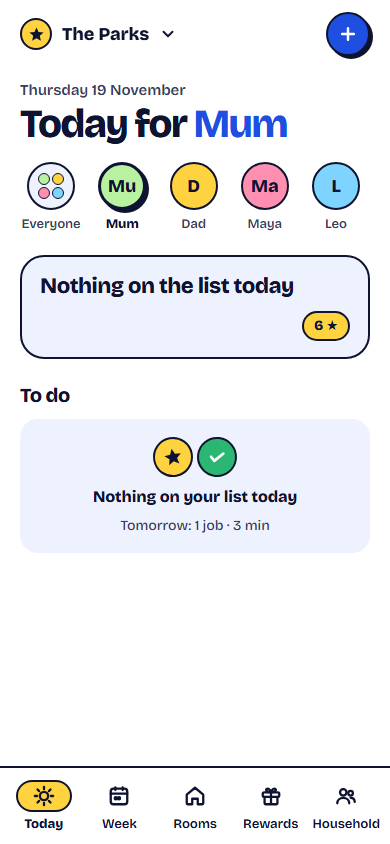
Made for a house where not everyone has a phone
Most chore apps assume every person who does a chore carries a smartphone. In a family with a six-year-old and a ten-year-old, that’s rarely true, and it’s why the reminding falls back on the parent who does.
sharechores gives you three ways in that need no phone at all:
- The family tablet. One QR scan sets up the kids view on a shared tablet, laptop or old phone. Kids tap their name and tick their jobs; no passwords to forget.
- Room stickers. Print a round QR sticker for each room. Anyone with a phone can scan it while cleaning to tick that room’s jobs on the spot.
- The printed chart. For the fridge, with turns already filled in. When a grown-up scans its code, today’s list opens ready to tick.
Adults join by an email link, and a household holds up to 12 people, each with their own colour, so a blended family, a grandparent who lives in or a teenager home from college all fit.
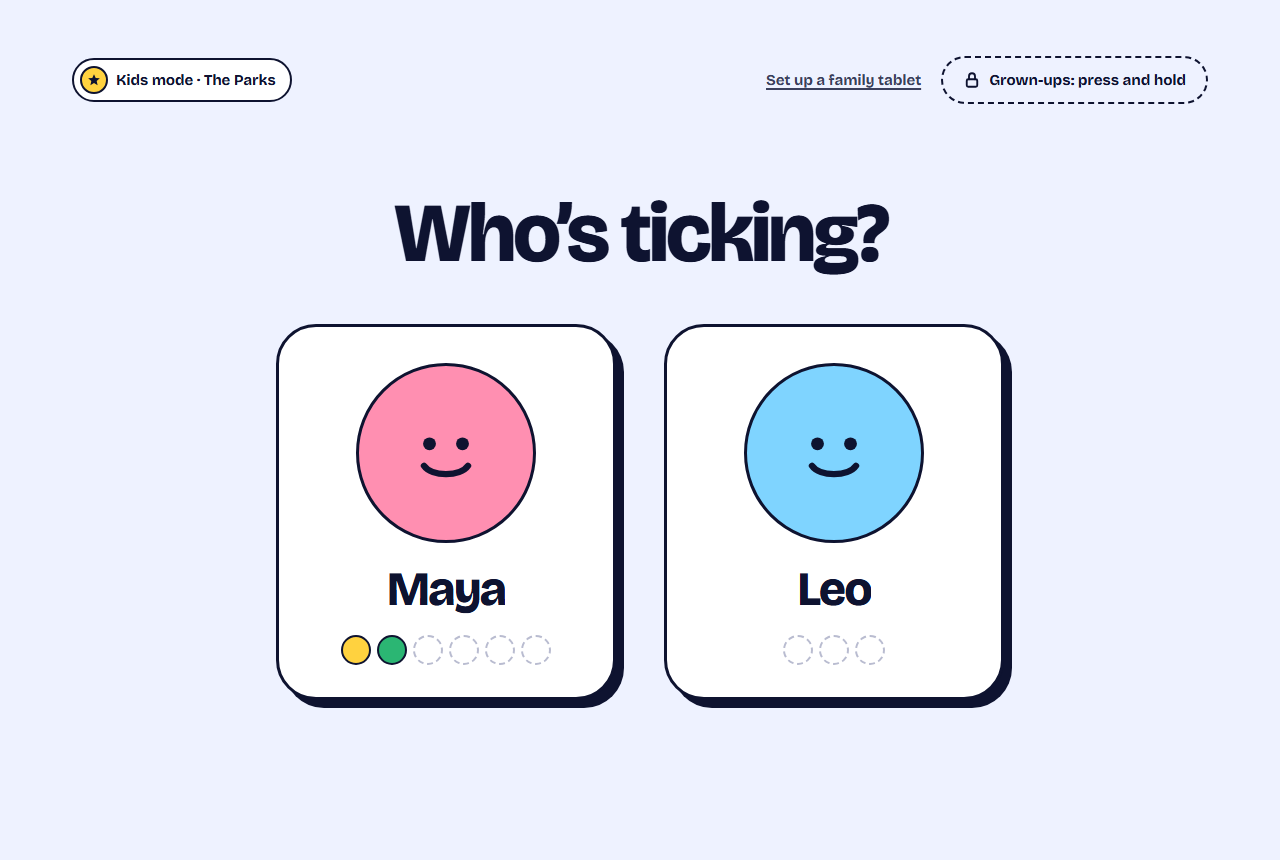
What sharechores costs
The free plan isn’t a trial. It covers one household of up to 12 people with up to 5 repeating chores, the today list, turns, rooms, points, the weekly count, 7 days of history and the printable chart, for as long as you like.
Two ways to pay, through our payment partner, when you want more: a 3-month pass for $3, paid once and never renewed, or Yearly for $10, which renews until you turn it off. Both add unlimited repeating chores, rewards your kids buy with their points, allowance tracking (sharechores records the amounts; you pay out your way), full history, phone reminders when it’s someone’s turn and a short email every Sunday with the week at a glance. When a pass ends, nothing is deleted: your first 5 chores keep running and the extras wait for you.
| Tool | A year for the family | How it bills |
|---|---|---|
| sharechoresOur pick | Free, or $10 for Yearly | Yearly renews until you turn it off; the $3 pass never renews |
| Cozi Gold | $39 | Renews each year |
| Tody Family | $40 | Billed yearly |
| Sweepy Yearly | $19.99 | Renews each year |
| S'moresUp Premium | $79.99 (App Store) | Renews each year |
| Skylight Calendar Plus | $79, plus the device | Renews each year |
| Greenlight Core | $57.48 | Renews each year |
| BusyKid | $48 | Billed yearly; annual plans aren’t refundable |
Moving your family over in one evening
- Write down every chore your current app or chart holds, with how often it comes round. Ten minutes with the old app open is enough.
- Open the free chore chart maker, add your family’s names and type the chores in. For each one, choose one person or taking turns.
- Save it as your household. Invite your partner by email link; add each child by first name.
- Set up the family tablet by scanning the kids-view QR code with it.
- Print this week’s chart for the fridge and, if you like, a sticker for each room.
- Tell everyone at dinner. The message below does the explaining for you.
From tonight, chores live in sharechores, not in my head. Everyone has a short list for today on the tablet or your phone. When it’s your turn for the dishwasher or the bins, it’s right there with your name on it. Tick it when it’s done and you get points. Nobody has to ask me who’s next.
Not ready to sign up? Start with the free chore chart maker: no sign-up, no email, a PDF ready to print in a couple of minutes. When you want turns that keep themselves and kids who tick their own jobs, save it as your household from the sharechores home page.
About this comparison
Based on publicly available information as of November 2026; features and prices may change.
Questions people ask
Is sharechores really free?
Yes. The free plan is for one household of up to 12 people, with up to 5 repeating chores, the today list, turns, rooms, points, the weekly count and a printable chart. There is no trial that turns into a charge.
Do my kids need a phone, an email or an account?
No. Children are added by first name only. They tick their jobs in the kids view on a shared tablet, phone or computer, or on the printed chart.
Is sharechores in the App Store or Google Play?
It doesn’t need to be. sharechores runs in the browser on any phone, tablet or computer, and you can add it to your home screen in two taps so it opens like an app.
What happens when the 3-month pass ends?
You’re never charged again. Your household carries on with the free plan: nothing is deleted, your first 5 chores keep running, and you can buy another pass or go Yearly whenever you like.