Printable chore chart or chore app? Why families end up using both
A chart on the fridge is impossible to miss. A chore app never forgets whose turn it is. Most parents assume they have to choose, then spend months maintaining whichever one they picked. The two solve different halves of the same problem, and sharechores was designed so the printed page and the app always describe the same week. Below: what paper does well, where it quietly breaks, what the app side adds, and a simple routine for running both without doing anything twice.
What a paper chart does that a screen can’t
Paper wins on visibility. Nobody has to unlock anything, find a charger or remember a password, and the plan sits at eye level in the one room everyone walks through before school. For a five-year-old who can’t read yet, a row of coloured boxes beside their name is the entire system.
- Everyone sees the same page. Your partner, the kids, a grandparent helping on Thursday: nobody needs an invitation to read it.
- It feels agreed. A printed plan on the fridge carries more weight than a note on one parent’s phone. It reads as the household’s plan rather than your request.
- Marking a box is satisfying. Small children like the physical tick, and the sheet visibly fills up as the week goes on.
- Visitors understand it instantly. A sitter can read it in ten seconds.
Where a paper chart runs out of road
The trouble usually starts in week two. Paper only knows what you wrote on it, so every change runs through whoever holds the pen, which tends to be the same person already carrying the household in their head.
- Turns don’t move by themselves. If the kids alternate the dishes, somebody has to rewrite or reprint the sheet each time the order changes.
- Counting is manual. Working out who did the most this week means squinting at ticks, and the debate begins the moment you miscount.
- The record disappears. When the sheet comes down on Sunday, last week goes into the recycling along with any proof of who really took the trash out.
- It stays in the kitchen. From the office or the car you can’t see whether the bathroom got done, and nobody gets a nudge when it’s their turn.
- Skipped jobs are silent. An empty box looks exactly the same on Monday as it does on Friday.
What the app side adds
sharechores takes over the parts paper is weak at: memory, arithmetic and fairness. You describe the household once, and it keeps running on that description until you change it.
- Shared jobs rotate each time someone ticks them, or swap weekly on Monday. If a child has practice tonight, Pass it on moves the turn to the next person straight away.
- A weekly who-did-what tally per person, so fairness becomes something you can look at instead of argue about.
- Points, shown as stickers, for every chore, plus the last seven days of history on the free plan.
- Rooms with a how-dirty-is-it meter that creeps up as days pass and empties when a chore in that room is ticked.
- A today list for each person with a few small jobs, never the whole house at once.
Paid plans add phone reminders when it’s someone’s turn, a Sunday summary email and full history. They start with a 3-month pass at $3, one payment that doesn’t renew.
Paper, app or both, side by side
| Setup | Seen at a glance | Turns stay fair | Who did what | Kids without phones | Cost |
|---|---|---|---|---|---|
| sharechores (app plus printed fridge chart)Our pick | Yes, on the printed weekly chart | Rotate on each tick or swap every Monday | Weekly count for each person | Kids view on a shared device, or the paper | Free for up to 5 repeating chores; paid plans from $3. |
| A paper chart on its own | Yes, on the fridge | Only when someone rewrites it | Count the ticks by hand | Yes | Paper and ink |
| A phone app with nothing printed | Only when someone opens it | Depends on the app | Depends on the app | Needs a screen within reach | Varies |
The bridge: a printed chart that scans back into the app
Every sharechores household can print a weekly fridge chart with everyone’s chores and this week’s turns already filled in. In the corner sits a QR code. Point a phone camera at it and today’s list opens, ready to tick. The paper tells people what to do; the tick lands in the app, where it counts.
- Add your people (up to 12, each with a colour) and your repeating jobs. Children need a first name only.
- Decide which jobs belong to one person and which take turns.
- Print the weekly chart and put it where shoes come off or breakfast happens.
- When a job is done, scan the code on the sheet, tap the name, tap the job.
- On Monday, print a fresh copy so the new turns show.
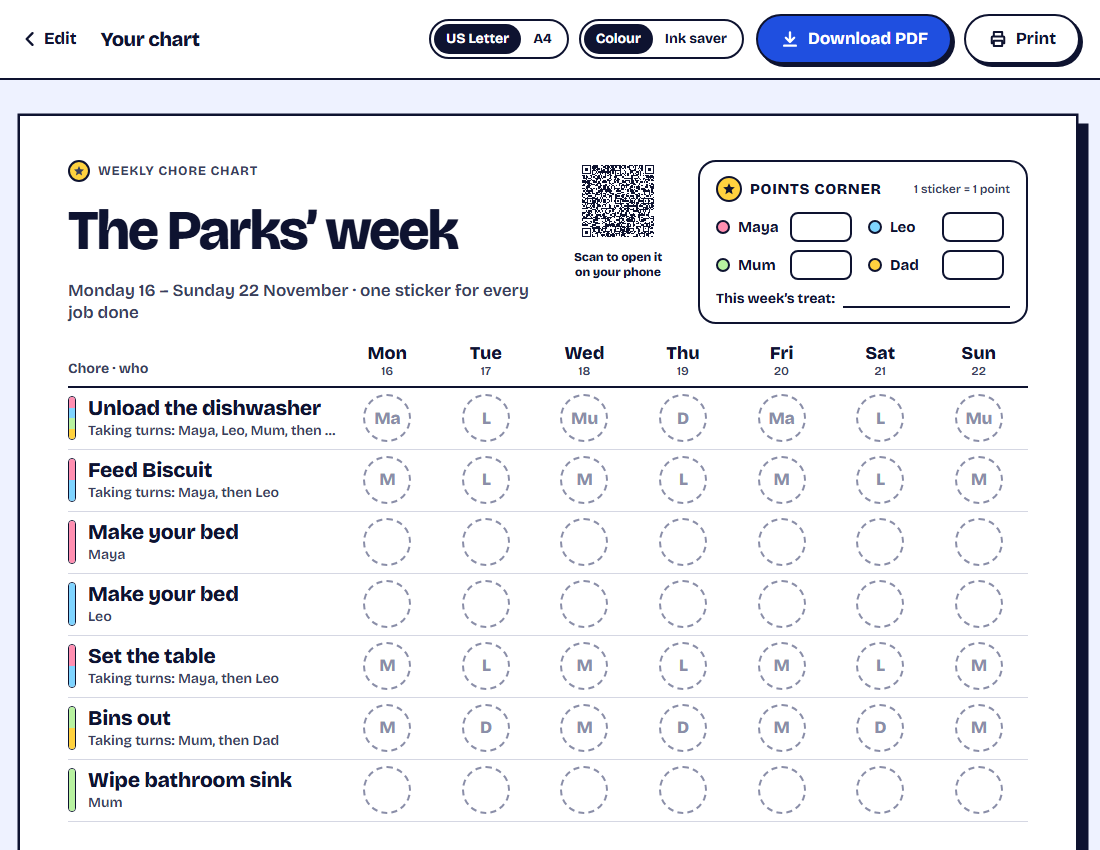
Not ready to set up a household? The free chore chart maker builds a printable chart with no sign-up and no email, downloadable as a PDF in A4 or US Letter. Its QR code reopens the chart on your phone, so editing next week’s version takes a minute.
A week of running both, without double work
One rule makes the combination work: the paper shows, the app records. If little ones love the pen, let them mark the sheet as well; the tick in sharechores is the one that goes into the weekly count.
How our chores work now: 1. Check the fridge chart for your jobs. 2. Do the job. 3. Scan the code on the chart (or use the kitchen tablet), tap your name, tap the job. Your sticker shows up straight away. Not sure whose turn it is? The app knows.
For the wider picture, see our side-by-side of family chore apps or the criteria for choosing a family chore app. You can also start your household on the sharechores home page.
Questions people ask
Is a printable chore chart enough on its own?
For a week or two, often yes. It struggles once jobs need to rotate, once you want a fair count, or when you need to see progress away from home. Printing it from sharechores keeps the paper and adds those pieces.
Do we have to tick everything twice when we use both?
No. The printed chart shows the plan; ticks go into sharechores by scanning the chart’s QR code, using the kids view, or tapping on a phone. Young children can still mark the paper for fun.
Can I print a chore chart without creating an account?
Yes. The free chart maker needs no sign-up or email and downloads a PDF in A4 or US Letter.