Leaving Cozi for chores? Why families pick sharechores
Cozi is a family organizer first: a shared calendar, to-do and shopping lists and a recipe library, with a chore list inside the phone app. If the chores are the part of home life you keep chasing, it helps to give them a place built for nothing else, where turns rotate on their own, kids tick jobs on the family tablet and nobody scrolls past an ad. Here is how the two compare for chores, and how to move your whole chore list to sharechores in a single evening.
The snags parents hit with chores in Cozi
Cozi’s chores page says Cozi Chores is in the Cozi app for iPhone and Android and isn’t available on the Cozi website right now. So the laptop on the kitchen counter can’t bring up the chore list in a browser.
The free version shows ads, and the App Store listing carries the “Contains Advertising” label. Going ad-free means Cozi Gold at $39 a year, and bought through the App Store, the subscription renews automatically each year.
Cozi chores repeat daily or weekly, each person gets their own list and kids can tick off their own chores. What Cozi doesn’t publicly describe is automatic turns, points, a room-by-room view, a weekly who-did-what count or a printable chore chart. Without those, the fairness questions (whose week is it for the bins? who has done the most this week?) drift back into your head, which is the very load you were trying to put down.
One more practical point: Cozi runs as one shared family account with one shared password and an email address for each family member. In sharechores a child is simply a first name.
Chores in Cozi and sharechores, side by side
| App | Chores open on | Ads | Automatic turns | What a child needs | Points and a printable chart | Family size | To go further |
|---|---|---|---|---|---|---|---|
| sharechoresOur pick | Laptops, tablets and phones, straight from the browser. | None, on every plan. | Free: rotate on every tick or every Monday. | A first name; they tick on the family tablet. | A sticker per tick; a printable week for the fridge. | Up to 12 people. | $3 for three months, no renewal; or $10 a year. |
| Cozi | iPhone and Android app; chores not on the Cozi website right now | Yes on the free version; Gold is ad-free | Not stated publicly | One shared family password, with an email address per member | Not stated publicly | Up to 12 family members | Gold: $39 a year |
What your chores look like once they move
sharechores treats the house as a set of jobs that come back, shared between people who each have a colour. Everything below is in the free plan:
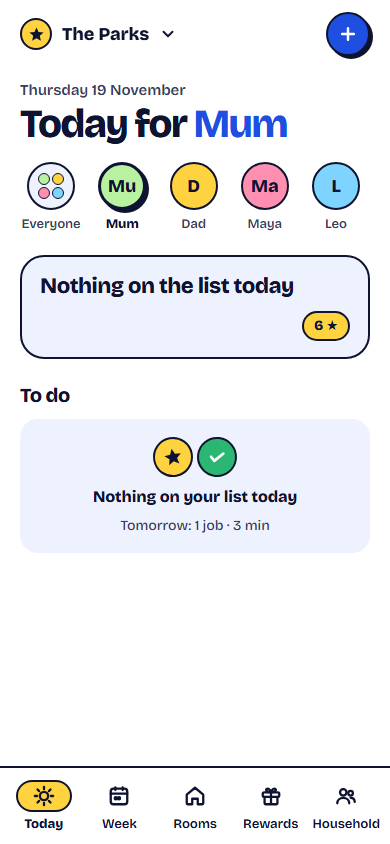
- A short list for each person today. Nobody opens the app to find the whole house waiting. Each person sees a few small jobs meant for today, and ticking one clears it.
- Turns without the arguing. Mark a chore as shared in turns and sharechores hands it to whoever is next once someone ticks it, or switches it over each Monday. If someone is at a sleepover, “Pass it on” skips them for now.
- Rooms with a dirt meter. Each room fills slowly as days go by since its chores were done, and ticking a chore empties it, so you can see at a glance where the house needs help.
- Stickers for every job. Each tick earns a point, and a weekly tally shows who pulled their weight without you keeping score.
- A kids screen on the shared device. Point the family tablet’s camera at a QR code once; after that it lands on a child-sized screen with buttons big enough for a six-year-old.
- Paper for the fridge. Print the week, each name and job and turn laid out in colour; scanning the code in the corner brings up the day’s jobs, ready to tick.
Move your chores across in one evening
- Open your chore lists on your phone and write each chore down with who usually does it and whether it repeats daily or weekly.
- Create the household on the sharechores home page and send your partner a join link by email; signing in with Google works too.
- Type in each child’s first name. That’s all a kid needs: there’s no password to set and no phone to hand over.
- Add the repeating chores. For each, choose one person or take turns. Jobs nobody wants, like the bins or the dishwasher, are the ones to put on turns.
- Group the chores into rooms so the dirt meter starts working for you.
- Link the family tablet or computer to the kids screen with its QR code, and park it where the kids walk past.
- Print this week’s page, stick it on the fridge, then send the family the note below.
Chores have moved to sharechores. Every one of us gets just a few jobs a day, and the tricky ones (bins, dishwasher, feeding the cat) now rotate, so nobody has to remember whose go it is. Kids: tap your name on the tablet by the fruit bowl and tick each job once it’s done. The sheet on the fridge shows the whole week.
Your first week on sharechores
Want a paper version first? Our printable chart builder needs no account and no email, and downloads as a PDF for A4 or US Letter. For the wider field, see our chore app comparison.
What it costs
Nothing in the comparison above asks for a payment. When your list grows past five repeating jobs, three months of every extra costs $3, paid once; the pass lapses quietly at the end and your setup carries on in Free with nothing removed. If you’d rather not think about it again, $10 covers a year, roughly 83¢ a month, and renewal can be switched off whenever you like. Paying unlocks:
- As many repeating chores as the house needs
- A rewards shop where kids spend the stickers they’ve earned
- A record of pocket money owed, which you settle in cash or by transfer (sharechores never handles money)
- Every past week, not just the latest seven days
- A round-up email each Sunday
- A nudge on the phone when a turn comes round
sharechores has no month-to-month billing and no trial waiting to convert. Card details go to our payment partner; we never see them.
About this comparison
Based on publicly available information as of November 2026; features and prices may change.
Questions people ask
Can I see Cozi chores on a computer?
Cozi’s own chores page says Cozi Chores is in the iPhone and Android app and isn’t available on the Cozi website right now. sharechores runs in any browser, so a laptop, desktop or tablet opens the same chores as a phone.
Does sharechores have ads?
No. There are no ads on the free plan or on paid ones.
Do my kids need an email address for sharechores?
No. In sharechores a child is simply a first name. They use the kids screen on whichever device the family shares, and any adult can tick a job on their behalf.
Is there a sharechores app to download?
There’s nothing to fetch from a store. sharechores is a web app: save it to your phone’s home screen and it launches from its own icon.